Employee Onboarding

See every new employee learn, practice, and progress.

Train Lens gives onboarding trainers one live view of every employee’s shared screen, making it easier to spot confusion, answer questions, and provide private support while the session continues.

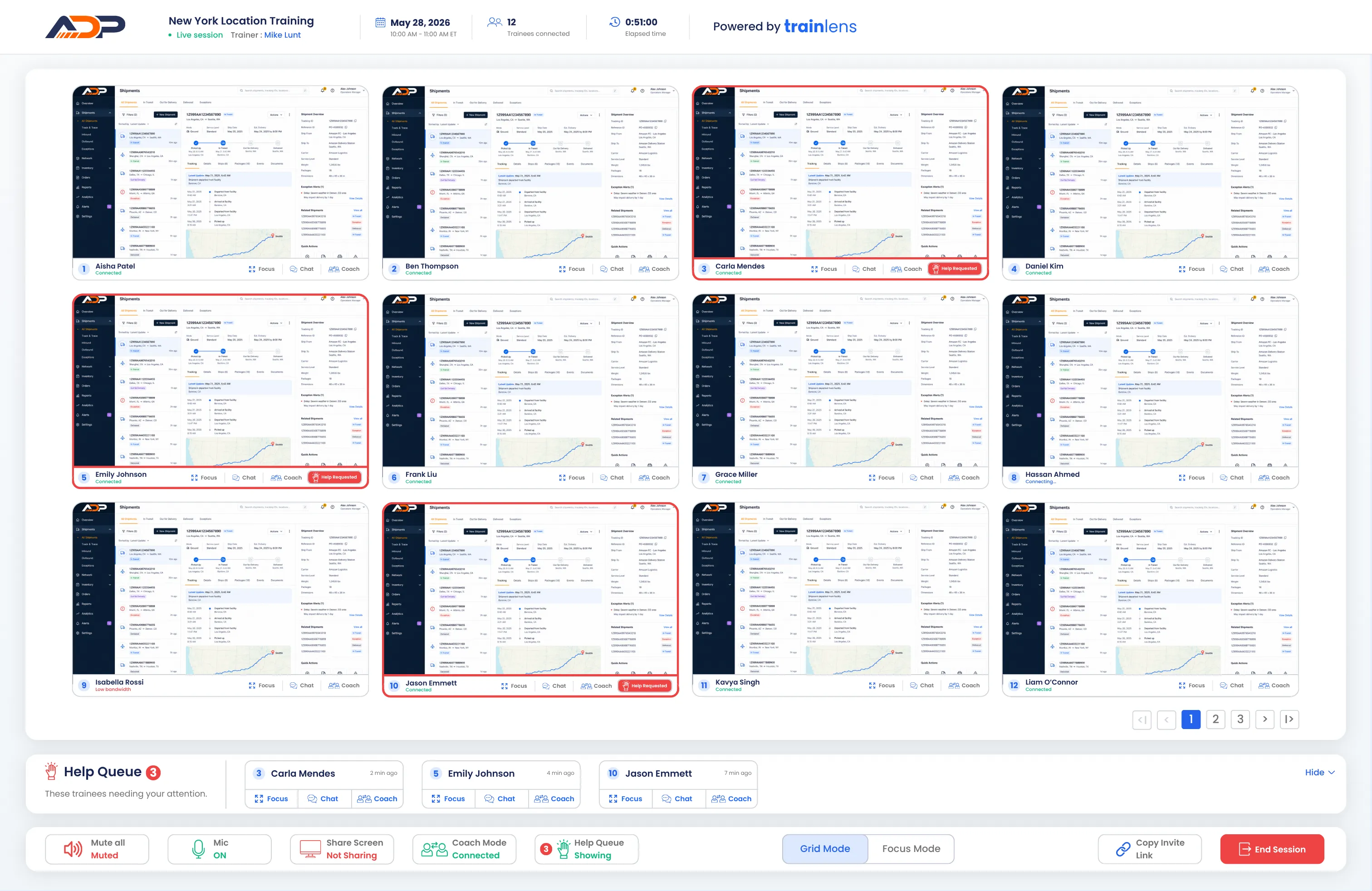
Train Lens showing every new employee’s shared screen during a live onboarding session.
✓
Every new hire stays visible
See progress as it happens.
Progress visibility

See who understands the process and who needs more support.

During employee onboarding, uncertainty is not always obvious. Train Lens lets the trainer follow each new employee’s shared screen, identify where someone is struggling, and provide support before they fall behind.

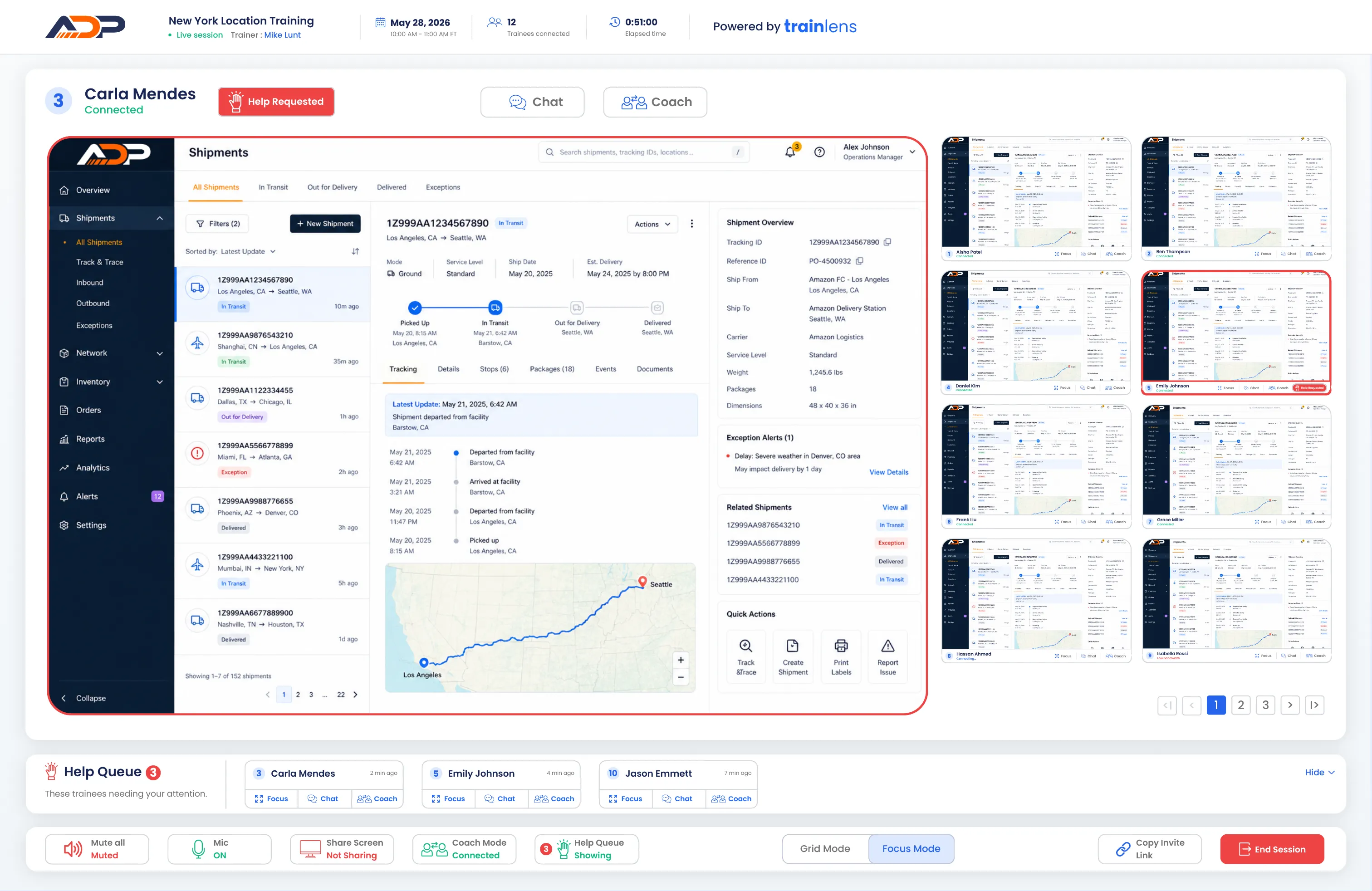
Interactive Preview: Select Grid Mode or Focus Mode to explore each trainer view.
01

Observe

See how each new employee is progressing through the onboarding exercise.

02

Identify

Notice confusion, missed steps, or help requests while the work is happening.

03

Support

Offer private guidance without interrupting the rest of the onboarding group.

Trainer providing private support during a live employee onboarding session.
!
Private support
Private onboarding support

Give new employees space to ask questions and build confidence.

Starting a new role comes with questions that employees may not want to raise in front of the group. Train Lens lets trainers help individual employees privately while the rest of the onboarding session continues.

See the problem
View the employee’s shared screen to understand exactly where they need guidance.
Respond privately
Answer questions without placing the employee or their work in front of the group.
Keep onboarding moving
Support one employee while maintaining visibility across the rest of the cohort.
Trainer-led practice

Show the process. Then watch employees apply it.

The trainer can demonstrate a workflow by sharing their screen with the group. Employees can then complete the process themselves while the trainer follows their progress and provides guidance when needed.

Demonstrate clearly
Walk the group through each step before employees begin the exercise themselves.
Observe hands-on practice
See how employees apply the process across their individual shared screens.
Reinforce the process
Correct misunderstandings and provide guidance while the experience is still fresh.
✓
Guided practice
Train Lens showing an employee’s shared screen during a guided onboarding exercise.
Train Lens Focus Mode showing a trainee’s shared screen and private coaching controls.
Employee onboarding in practice

One process. Different levels of confidence.

Imagine a group of new employees learning how to complete a customer workflow in an unfamiliar software system. Everyone follows the same demonstration, but they will not all progress at the same pace.

The trainer can view each shared screen, notice when someone misses a step, and respond before that employee becomes lost. If a new hire requests help, the trainer can open their screen and provide private guidance while the rest of the group continues practicing.

Train Lens makes onboarding more responsive without repeatedly stopping the session.
Private by design

Learning something new should not put mistakes on display.

Each employee shares their screen directly with the trainer, not with the rest of the onboarding group. New hires can practice, ask questions, and receive guidance without exposing their work to their peers.

✓
Visible to the trainer
Other employees cannot see the new hire’s shared screen.
Sharing
Questions about screen sharing?
Employee onboarding questions

Before your next onboarding session.

Learn how screen visibility, private support, and trainer-led demonstrations work during employee onboarding.

How is Train Lens different from onboarding through a video meeting?
+
Can the trainer demonstrate a process to the group?
+
Do new employees need to install software?
+
How can an employee ask for help?
+
Can other employees see a shared screen?
+
Does Train Lens record employee screens?
+
Can Train Lens support remote and hybrid employee onboarding?
+
What types of employee onboarding work well with Train Lens?
+
Ready to improve employee onboarding?

Help every new employee learn with confidence.

Book a personalized demo and see how Train Lens can bring greater visibility and more responsive support to your employee onboarding sessions.