Screen Sharing & Privacy

See every trainee’s shared screen without showing it to the group.

Train Lens gives trainers one live view of every trainee’s shared screen. Each screen remains private from the rest of the cohort, so trainers can follow progress and provide support without exposing a trainee’s work to everyone else.
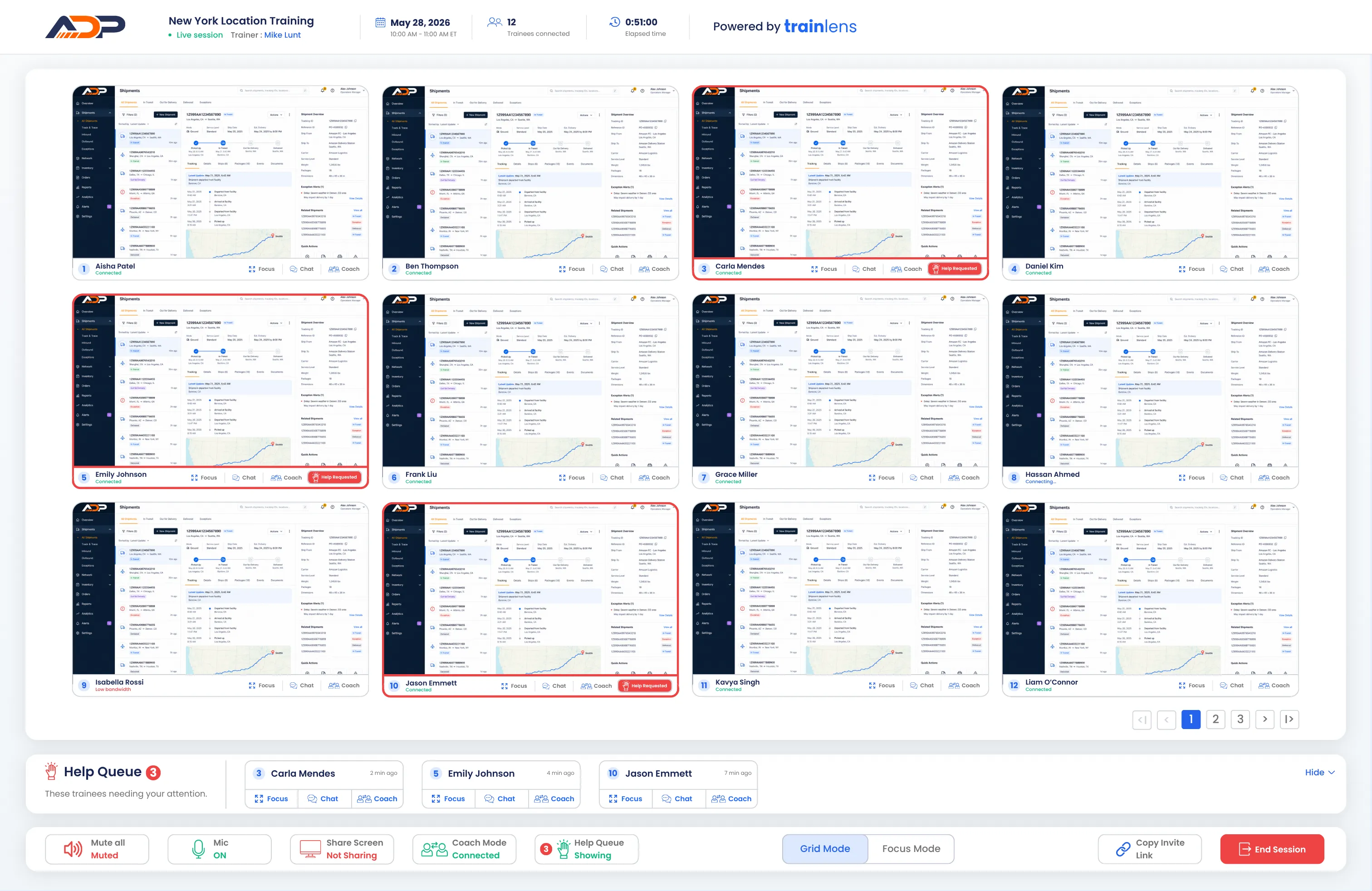
Train Lens showing multiple trainee screens privately within the trainer’s Grid Mode view.
✓
Visible to your trainer
Private from the group.
Privacy by design

One view for trainers. Another for trainees.

Give support where it’s needed while keeping each trainee’s shared screen private from the group.

Visible to the trainer

See every shared screen in real time so you can spot problems and provide guidance.

Private from the group

Each trainee’s screen is visible to the trainer only, never to other trainees in the session.

No recording or storage

Shared screens are transmitted during the session and are not recorded or stored by Train Lens.
Trainer guiding a live software training session from her own workstation.
Built for private support

Visibility for the trainer. Privacy for every trainee.

Most meeting platforms show a shared screen to everyone in the call. Train Lens works differently. Every trainee shares their screen privately with the trainer, who can view the entire cohort together without exposing anyone’s work to the group.

The trainer sees the cohort
View every trainee’s shared screen together and get a closer look when someone needs support.
Trainees keep working privately
Each trainee’s screen remains hidden from everyone else in the session.
Sharing stays in their control
Trainees can clearly see when they are sharing and can stop sharing when needed.
Two sides of the Same session

The trainer sees the group. Trainees see only what they need.

Train Lens separates the trainer view from the trainee experience. The trainer gets the visibility needed to support the session, while each trainee stays focused on their own work and the trainer’s guidance.


Trainer conducting private live software training from a laptop
Trainer experience
Every shared screen in one place.
Follow the whole cohort in Grid Mode, open an individual screen in Focus Mode, and respond without making that trainee’s work public.
✓
View all active shared screens
✓
See help requests and sharing status
✓
Open a closer view or begin private coaching
Trainee sharing her laptop screen privately during an online training session
Trainee experience
A private workspace that stays private.
Trainees share directly with the trainer. They can see when sharing is active, stop sharing when needed, and view the trainer’s screen when the trainer presents.
✓
Other trainees cannot see their screen
✓
Sharing status remains visible
✓
Trainer demonstrations remain available to the group
Built for real training

Meeting tools help people present. Train Lens helps people practice.

Conventional meeting tools are designed around calls and presentations. Hands-on training requires a clearer view of how every trainee is progressing, with ways to provide support without exposing their work or stopping the group.

Conventional meeting tools
Built around the group call
-
Focus on one shared screen at a time
-
Trainees must speak up to get noticed
-
Shared work is often shown to the group
-
Individual support can interrupt the session
Train lens
Built around the training
+
View every trainee’s shared screen together
+
See help requests as they happen
+
Keep trainee screens private from the group
+
Provide focused support while training continues
Screen sharing questions

What trainees and trainers need to know.

Learn how screen visibility, sharing controls and private support work during a Train Lens session.

Who can see a trainee’s shared screen?
+
Can the trainer see every trainee’s screen at the same time?
+
Can a trainee stop sharing their screen?
+
Does Train Lens record or store trainee screens?
+
Can the trainer share their own screen with the group?
+
Do trainees need to install software?
+
How does private coaching work?
+
Ready to see Train Lens?

See every trainee’s progress without putting their work on display.

Book a personalized demo and explore how Train Lens can bring greater visibility and more private support to your live training sessions.